
.jpg?branch=prod&enable=upscale&format=auto&quality=85&crop=16:9,smart&fit=crop&width=3840&height=2160)
可靠實用
Philips monitors meet the needs of today’s dynamic, polyvalent professionals with a wide array of innovative solutions designed to maximize productivity, deliver true-to-life visuals, enhance well-being, and safeguard the environment.


LowBlue 模式讓眼睛在工作時感覺舒適
研究顯示紫外線能損害眼睛,而長期接觸 LED 螢幕的短波長藍光會損害雙眼及影響視力。為健康而設的 Philips LowBlue 模式設定,使用智能軟件技術以減低短波長藍光對眼睛的傷害。


不閃爍技術減少雙眼疲勞
由於亮度由 LED 背光螢幕操控,部份用戶會於螢幕體驗閃爍,造成雙眼疲勞。Philips 不閃爍技術採用新方案調節亮度及減少閃爍,讓您享受更舒適的視覺效果。
EasyRead 模式帶來彷如紙上閱讀的體驗

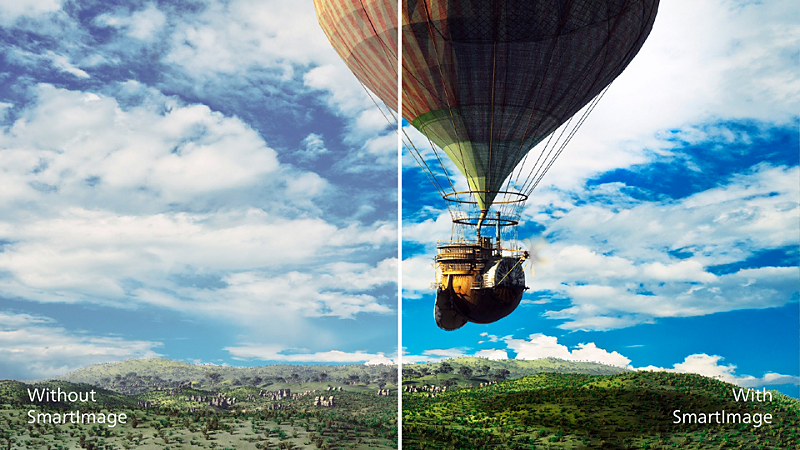
SmartImage 預設提供簡易優化圖像設定
SmartImage 為 Philips 獨創的尖端科技,能夠分析屏幕播放的內容並提供最佳的顯示效能。簡單易用的介面允許您選擇各種模式,如辦公、相片、影片、經濟等,以配合所使用的應用程式。SmartImage 能根據您的選擇,有效優化影像和影片的對比度、色彩飽和度及清晰度,以達到最佳的顯示效能。經濟模式可以為您節省大量電力。只要按一下按鈕即可馬上享受!

SmartContrast 帶來深沉豐盈的黑色細節
SmartContrast 是一項 Philips 技術,能夠分析正在播放的內容,在觀看影片或玩遊戲時遇到較暗顏色時可自動調整色彩和控制背光強度,有效加強對比度來顯示最佳數碼影像;選擇使用「經濟」模式時,會調整對比度並微調背光,以適當顯示日常辦公室應用程式並降低能源耗損。
100% 可回收包裝物料
100% 可回收包裝物料,減低對環境造成的影響。
技術規格
Curved Monitors
Philips monitors Curved displays take this experience one step further, gently wrapping around you and embracing your field of vision with a curve that mimics the natural shape of the eye.


Docking Solutions
Experience the convenience of a single cable connection that simplifies your setup and boosts productivity with Philips USB-C docking monitors. With just one cable, you can extend your laptop's battery life without needing extra power adapters.

Video Conferencing
The Philips Video Conferencing Monitor offers a seamless, all-in-one solution for video calls, with an integrated webcam, microphone, and speakers for full audio-visual support. Designed for convenience and efficiency, it features Philips’ advanced technology, USB-C docking, and device consolidation to save space, energy, and costs—perfect for compact workspaces.
Compare
- 242B1H/69
- B 系列
- 24(可視尺寸 23.8 吋 / 60.5 厘米)
- 1920 x 1080(全高清)
- 27B1U7903/69
- Brilliance 7000
- 27 吋(68.6 厘米)
- 3840 x 2160(4K 超高清)
- 32B1U3900/69
- 3000 系列
- 32(可視尺寸 31.5 吋 / 80 厘米)
- 3840 x 2160(4K 超高清)
- 45B1U6900CH/69
- 6000 系列
- 45(可視尺寸 44.5 吋 / 113 厘米)
- 5120 x 1440 (Dual QHD)
- 499P9H1/69
- P 系列
- 49(可視尺寸 48.8 吋 / 124 厘米)
- 5120 x 1440 (Dual QHD)
- 49B2U5900CH/69
- 5000 系列
- 49(可視尺寸 48.8 吋 / 124 厘米)
- 5120 x 1440 (Dual QHD)


客戶服務及支援
獲取產品幫助、尋找說明書、了解貼士和秘訣,及解決任何問題
訂閱電子通訊
- 獲取最新產品資訊及健康生活貼士
- 優先尊享購物優惠
- 會員專享禮遇
- 獲取最新產品資訊及健康生活貼士
- 優先尊享購物優惠
- 會員專享禮遇
響應時間值等於 SmartResponse
NTSC 區以 CIE1976 為基礎
sRGB 區以 CIE1931 為基礎
EPEAT 評級認證僅於 Philips 註冊產品的地方有效。請瀏覽 https://www.epeat.net/,查看您國家/地區的註冊狀態。
顯示器實際可能與顯示圖片有別。